
Remember The Milk in 2017: Year in Review

Happy New Year, everyone! We kept pretty busy in 2017 (Bob especially), and we thought we’d kick off the year by sharing some of our favorite happenings from the past year.
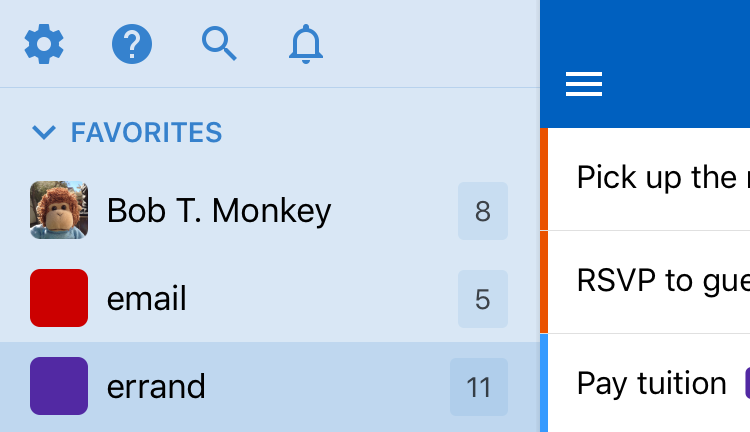
Find the important stuff quickly with Favorites
One of the first things we launched in 2017 was our super handy Favorites feature. Choose your favorite lists, Smart Lists, tags, locations, and contacts, and have them all displayed in their very own Favorites group. No more hunting through the navigation for those super important lists or contacts! Bob has been making copious use of this feature, and it’s now one of his, er, favorites.
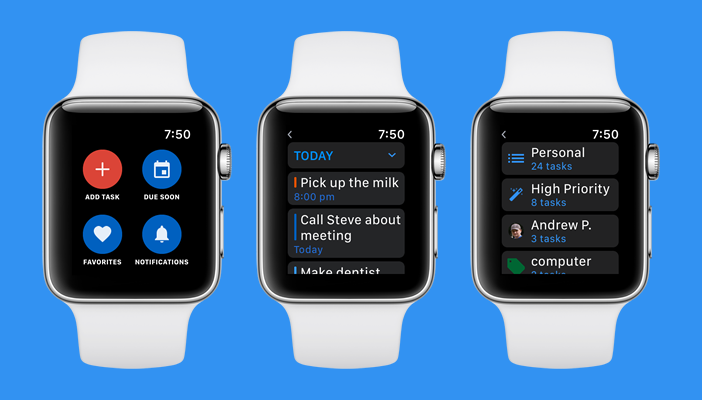
Introducing Remember The Milk for Apple Watch
We were excited to finally launch our Apple Watch app! Remember The Milk for Apple Watch has everything you need to stay organized on the go: add tasks, subtasks, and notes easily with dictation support; quickly complete and postpone tasks; see what’s due soon; review your favorite lists, Smart Lists, tags, locations, and contacts; get notified with reminders; and more!
You can also set up Remember The Milk as a complication on your favorite watch face to quickly see how many tasks you have due today, how much time is estimated, and how many are overdue. Our Apple Watch app is available exclusively for Pro users (thanks for your support!).

The new and improved Remember The Milk for Siri
We’ve long had support for adding tasks via Siri, but were excited to expand this feature with updated support for Siri on iOS 11 and watchOS 4. In addition to adding tasks, you can now tell Siri to complete tasks, and ask what’s due on a specific day, too.
Here’s a few examples of how to talk to Siri:
- “Add call Bob to my task list in RTM”
- “Mark call Bob as complete on RTM”
- “Start a list called My Awesome Project on RTM”
- “What do I have due today in RTM?”

Introducing Remember The Milk for IFTTT
IFTTT is an awesome service that makes it easy to connect the apps and services that you use every day (sometimes in creative and totally unexpected ways!). It was one of our most-requested features, so we were very excited to launch Remember The Milk for IFTTT, available exclusively for Pro users.
We created a bunch of Applets to start with (one of the most popular ones adds a task to Remember The Milk whenever you star an email in Gmail), but the really cool thing about IFTTT is that you can create your own, too!
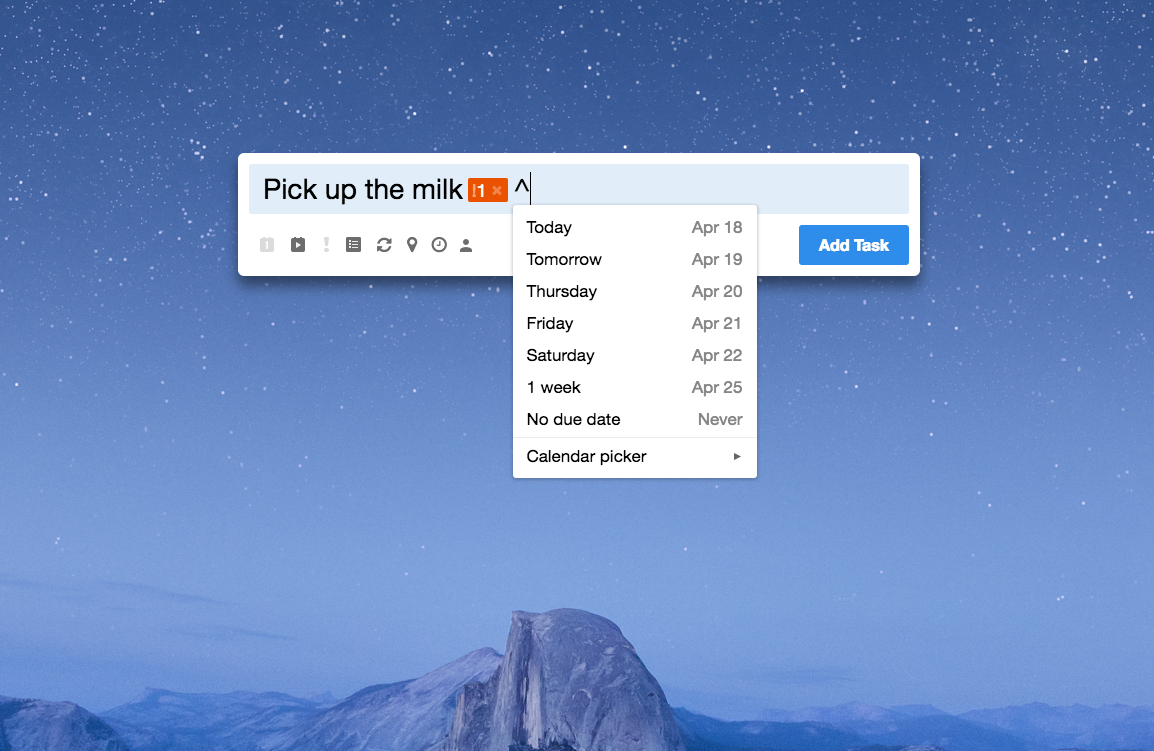
Add your tasks faster than ever with Smart Add on the desktop
Bob figured that adding tasks with Smart Add is pretty fast, but he got to wondering if it could be even faster. Thinking turned to coding, as it often does with Bob. After an update to our Mac, Windows, and Linux apps, you can now add tasks faster than ever with Smart Add on the desktop. Just use a quick keyboard shortcut to bring up Smart Add wherever you are, and start adding!
The Smart Add Hotkeys on each platform are:
- Mac: ⌥ + ⌘ + M
- Windows: Ctrl + Alt + M
- Linux: Ctrl + Alt + M
Once you’re done typing your task, hit the Enter key to instantly add it. Want to keep adding more tasks? Press Shift + Enter (instead of just Enter), and Smart Add will stay on the screen, ready for you to add another task (or whole bunch of tasks!).

Updates for our Android and iOS apps
We’ve continued to improve our mobile apps with a whole bunch of updates throughout the year. On iOS, in addition to support for our new Favorites feature, the Apple Watch app, and expanded Siri support, we updated the app to support iOS 11 and the iPhone X. We also added support for rich reminder notifications, made a bunch of small improvements, improved app performance, and squished numerous bugs.
Over on Android, we also added support for Favorites, and updated the app to support Android Oreo. Bob had some bug squishing to do, but we also made a bunch of small improvements and worked to make the app faster, too.

Import your tasks from Wunderlist
With Microsoft’s announcement that they’ll be retiring Wunderlist, we got a lot of requests for an option to import tasks from Wunderlist into Remember The Milk. We added an import feature under ‘Account settings’ then ‘Import’ in our web and desktop apps. If you’d like to see support for importing from another app or service, please let us know!

What’s next for Remember The Milk?
Ah, an excellent question! Bob’s pretty secretive, but we’re busy cooking up some new stuff that we’re really excited about (and of course, we’re always working to improve Remember The Milk!). We’re on a never-ending quest to make the world more organized and productive, so be sure to let us know how we can help you. ;)
Thanks for using Remember The Milk, and Happy New Year from everyone on the team! :)



