
Tips & Tricks Tuesday: Using tags for context

We’re big fans of tags around here for organizing our tasks across all our lists (and we have a few! :). This week’s featured tip comes from lnussdor, who shares some simple, no-fuss ideas for making the most of tags to stay streamlined and productive.
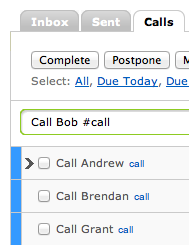
I ascribe to the GTD philosophy of “getting it all out of your head.” This philosophy is perfect match for RTM. I am able to use any device to add any tasks or ideas that come to me on the fly. I started to use the tags to denote the context (or type) of the task. For example, all of my tasks that are phone calls are tagged with “calls.” When I filter my task list by the tag “calls,” my entire list of calls are at my fingertips. This immediately increases my productivity because like buying peanut butter in bulk, doing similar tasks in bulk helps me whiz through my tasks! The “calls” tag is for both my work and personal calls with the same tag, but they are in different folders, in case I want to separate them.
Finally, I went into the Settings menu and changed the Default Due Date to “never.” The original Default Due Date is set to “today”, but it is important not to have many tasks show up on a particular day because, in my experience, it can be overwhelming to have too many tasks show up on one specific day. Additionally, I have already spent a previous life with Covey rewriting all of my tasks from the day before to the current day. ONLY tasks that have to be done a specific day are listed on that day. For example, I may need to call my dentist to reschedule an appointment on “some” day, but I have to call my friend to wish her happy birthday on a specific day. This allows me a greater sense of accomplishment by getting all (or most) of my tasks done when I only have 5-10 per day. If I have time for extra phone calls, I can pull up my calls and deal with them as my time allows.
Thanks for sharing this tip, lnussdor! You’re our Tips & Tricks Tuesday winner this week.
Do you have a suggestion for our weekly Tips & Tricks post? Got an interesting set-up or idea? Head over to the Tips & Tricks forum, add a new topic, and let us know how you use Remember The Milk. Each week we’ll give away a 1 year Pro account to the user whose idea inspires the Tips & Tricks Tuesday blog post for that week.



