
Tips & Tricks Tuesday: Use a "Dashboard" to avoid misfiling a task (or missing a deadline!)

With Smart Lists, there are an infinite number of different ways that you can view your tasks (see the useful searches post for just a few examples). This tip, shared by zero023z, describes a handy “Dashboard” list:
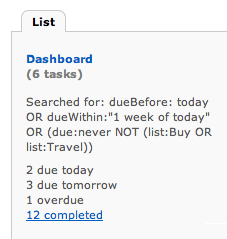
I have a Smart List in my account called Dashboard, which I use for two purposes:
• To make sure I’m not missing an important or overdue task
• To make sure all my tasks are properly filed
The Dashboard hunts down all the tasks that:
• Are overdue, due today, or due within the next 7 days.
• Are missing a due date
• (OPTIONAL) Are missing a location
• (OPTIONAL) Are not tagged
The “OPTIONAL” bullets are additional search criteria you could add to your own Dashboard if you’re the kind of person who ALWAYS tags or adds a location to every task.
You can use a Dashboard as a “sanity checker” to be sure you haven’t let any tasks fall through the cracks.
You can also EXCLUDE certain lists from the Dashboard that are “immune” to your usual rules.
For example, I have a list called Buy (things to buy) and a list called Travel (places I want to go). I often add tasks without due dates to those two lists, because they double as “wish lists” (i.e. things I’d LIKE to buy, and places I WANT to go).
My Dashboard is smart enough to let me off the hook for not putting a due date on a Buy or Travel task.
My Dashboard uses the following search criteria:
dueBefore: today OR dueWithin:“1 week of today” OR (due:never NOT (list:Buy OR list:Travel))
You can customize your own Dashboard by changing the list names above, and/or adding optional features like isTagged:false to find tasks that aren’t tagged, or isLocated:false to find tasks that have no location.
Thanks for sharing this tip, zero023z! You’re our Tips & Tricks Tuesday winner this week.
Do you have a suggestion for our weekly Tips & Tricks post? Got an interesting set-up or idea? Head over to the Tips & Tricks forum, add a new topic, and let us know how you use Remember The Milk. Each week we’ll give away a 1 year Pro account to the user whose idea inspires the Tips & Tricks Tuesday blog post for that week.



