
Tips & Tricks Tuesday: Get creative with Emoji for Smart Lists

This week’s tip comes from mstackhouse1, who has a neat suggestion to add a bit of color to your lists – perfect if you have a bunch!
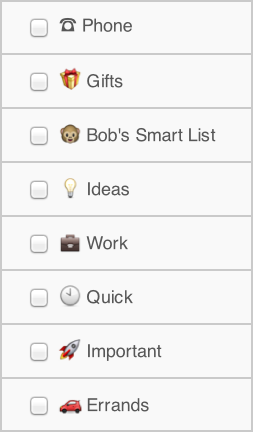
Sometimes when you open your todo lists you are assaulted by a wall of plain text. Maybe a few colors, if you are using priorities. What if you could bring in some right-brained creativity to your left-brained lists?
For those of you using iOS devices and/or Mac OSX Lion, try naming your Smart Lists symbolically using Emoji–colorful icons–instead of words. In case you aren’t aware, Emoji can be accessed via the Settings>General>Keyboard>International Keyboards page on your iOS 5.x device.
For example, many people have a “hot list” of items that is created via a Smart List saved search. Why not represent that with flames or rockets instead of words? Or a grocery list as an assortment of food icons? The possibilities are endless, and you are free to make a fresh change at any time.
Now, I don’t personally use Emoji for regular lists or tags, because I want to be able to add items very quickly via twitter on the mac, and adding Emoji is a slower process there. But feel free to do that if it works for you. You can add them to your task titles too.
The Emoji sync and display just fine among iOS and Mac Lion computers, and are fully searchable just like text.
You will be amazed how much lighter and friendlier your Smart Lists and other items seem. Even better, you’ll be able to see at a glance exactly what list is what without even thinking about it.
Thanks for sharing this tip, mstackhouse1! You’re our Tips & Tricks Tuesday winner this week.
Do you have a suggestion for our weekly Tips & Tricks post? Got an interesting set-up or idea? Head over to the Tips & Tricks forum, add a new topic, and let us know how you use Remember The Milk. Each week we’ll give away a 1 year Pro account to the user whose idea inspires the Tips & Tricks Tuesday blog post for that week.



