
Android app update: Customizable widgets and start screen, Quick Search Box for Android, and HTC Tattoo and Motorola Droid support

While our Android app has undergone a whole bunch of small updates since its launch, we’re excited today to announce our first update to include new features: version 1.1.0 (codename: “Bender”). This update brings new stuff based on the incredibly helpful feedback we’ve received from you guys, our lovely users. :)
Widget customization
Since we launched the app, the most highly requested feature has been “more widget options!”. We’re pretty happy today to bring you exactly that. :) You can now choose between two different sizes (2x2 and 3x3) and customize what the widget shows:
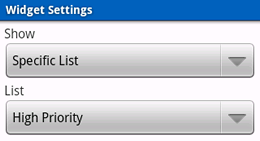
Choose between displaying tasks due today, all tasks, or tasks from a specific list. That third option is pretty powerful, because the widget can show tasks from a Smart List – you could show your high priority work tasks (priority:1 AND list:Work) or tasks you can do in under 20 minutes (timeEstimate:“< 20 min”). For more Smart List inspiration, check out our useful searches post.
Start screen customization
Another highly requested feature, you can now customize the screen that the app starts up on from the Settings screen. Choose between screens like Today, Tags, and Nearby, or select a specific list (or Smart List) to start on. Want to go directly to your tasks due this week (dueWithin:“1 week of today”) on app start up? No problem!
Quick Search Box for Android support
Quick Search Box for Android (available in Android 1.6 and later) is a very handy system-wide search feature that’s available from your device’s home screen – and now it can search your tasks! You can search for a task name or use the advanced search criteria to locate your tasks:
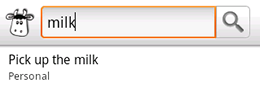
To enable searching for Remember The Milk on your device, you’ll need to go to Settings > Search > Searchable items > and check ‘Remember The Milk’.
HTC Tattoo and Motorola Droid support
The app now has support for devices with different screen resolutions and densities. So what’s this mean? The app supports the HTC Tattoo and Motorola Droid (also known as the Milestone), which is good to know if you’re planning to buy a Droid today :).
We hope you enjoy these updates! Want to learn more about the app in general? Check out the Remember The Milk for Android section of the site.



