
Twitter your tasks

We’re big fans of Twitter, an awesome service which poses the simple question, “What are you doing?”, and lets you post your activities and thoughts (so long as they’re 140 characters or less). You can send updates to Twitter via SMS, IM, the website, and third-party applications, making it easy to update from anywhere.
Those of you already Twittering may be familiar with a neat feature: the ability to send direct (private) messages to your friends on Twitter. We were playing around with Twitter and thought to ourselves, “Selves, wouldn’t it be cool if you could add RTM as a friend and talk to it as though it were your personal tasks assistant?”.
You can see where this is headed, right?
Introducing Remember The Milk for Twitter
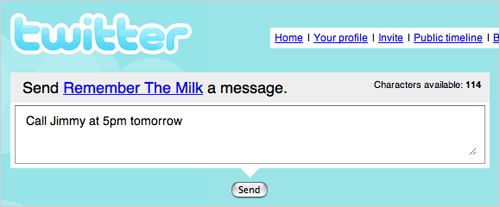
Add rtm as your friend on Twitter, and you can add new tasks and interact with your existing tasks by direct message. Oh, and you can get reminders via Twitter too.
Adding tasks via Twitter
Twitter asks, “What are you doing?”; RTM asks, “What should you be doing?”. Just send rtm a direct message with the name of a task and (optionally) when it’s due. The task will be added to your inbox, and RTM will remind you about it later.
pick up the milkcall jimmy at 5pm tomorrowreturn library books in 2 weeks(You can send a direct message on Twitter by posting an update with d rtm your message – by SMS, IM, the web update box, or a third-party app like Twitterrific. So, you’d add a task with d rtm pick up the milk.)
What should your friends be doing?
Organising yourself isn’t enough? Don’t stop there then! Send rtm a direct message with your friend’s Twitter username and a task for them, and the task will be sent to their RTM inbox (they’ll get notified on Twitter too).
@bobtmonkey buy more bananasCommand your tasks
rtm is at your service and will respond to various commands that you send it by direct message. For instance, you can tell it to complete a particular task for you:
!complete call jimmyDon’t remember what you’re supposed to be doing today? rtm knows – just send a direct message to find out.
!todayOut and about, and forgotten what’s on your shopping list? No problem, just direct message rtm via SMS and you’ll receive your list back.
!getlist shoppingSee the list of commands to find out what else is possible (check out the handy shortcuts for commands too).
Ready to set it up?
Want to get started, or learn more about how it all works? Head on over to the Remember The Milk for Twitter page to find out more and complete the quick and easy set up process.



