
Tips & Tricks Tuesday: Using Time Estimates

This week’s idea comes from RTM user chandra.gaajula, who shared a great tip in the Tips & Tricks forum recently. Like me, Chandra sounds like he has lots of different tasks in various lists and he likes to know how much time he needs to set aside to get everything done.
First things first: you need to make sure all your tasks have a time estimate included in the task details. Without it, the following won’t work.
Chandra suggested creating a new Smart List with the search term of:
status:incomplete AND isShared:false AND due:today
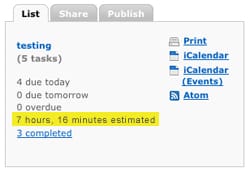
This will create a new Smart List that displays all the tasks you have due today. In the List detail view, you’ll see how long it will take to complete all the tasks displayed in the list (this is highlighted in the image to the right). This will give you an idea of how long it will take to complete your list – very handy stuff, especially for planning your day.
Chandra’s idea inspired me to create a couple of new search terms that will help fill idle blocks of time.
Have 15 minutes spare and want to complete a task? Use this search term to create a <15 minutes Smart List (i.e., your list will be filled with tasks that you estimate will take just 15 minutes or less to complete):
status:incomplete AND timeEstimate:“< 15 minutes”
Perhaps you have an hour spare but not much more? Try this search term and create a Smart List:
status:incomplete AND timeEstimate:“> 1 hour ” AND timeEstimate:“< 1.5 hours”
Pretty handy stuff, right? The final word should go to Chandra who says “you are likely to overwhelm yourself with tasks if you don’t realize the effort involved in accomplishing them for a given day", which is very true. I think you’ll find the tips above really handy for organising your day, so make sure you get into the habit of including Time Estimates for each of your tasks and you’ll be on your way!
Congratulations to this week’s Tips & Tricks Tuesday winner - chandra.gaajula. Thanks for sharing this great tip!
Do you have a suggestion for our weekly Tips & Tricks post? Got an interesting set-up or idea? Head over to the Tips & Tricks forum, add a new topic, and let us know how you use Remember The Milk. Each week we’ll give away a 1 year Pro account to the user whose idea inspires the Tips & Tricks Tuesday blog post for that week.



