
Tips & Tricks Tuesday: Two quick ways to add tasks to Remember The Milk: Unix Command Line + Automator Service in Snow Leopard

We have two Tips & Tricks Tuesday winners this week! Both users provide handy tips for adding tasks to Remember The Milk, and with one tip building upon the other, we figured both deserve to be here. :)
Adding tasks from the Unix Command Line
Looking for a speedy, text-based way to add new tasks? Try this tip from manning999:
This probably applies to a very small audience, aka engineers and programmers who work in a Unix terminal (Linux, Solaris).
With Smart Add, you can mail your new task to your inbox email address from a shell, without having to leave the terminal and disrupt your flow. For example, if you are in the flow working and coding, and Bart asks you over the cube wall to test his code changes he just committed, you could enter the following line on the command line:
mail -s “Test code changes committed by Bart. ^tom @ 9a \!1 #Testing #na @Work” homersimpson+abc123@rmilk.com
The properties in the example would cause the task “Test code changes committed by Bart.” to be added to homersimpson’s RTM account. In addition, the task will have a due date/time of tomorrow at 9:00 a.m., have a high priority, be added to the Testing list (assuming that list exists), be tagged with na (for next action), and be added to the location Work.
Check out the full post from manning999 for more details on how this works.
Adding tasks with the Automator Service in Snow Leopard
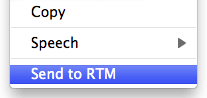
Our second winner, eddm, was inspired by manning999’s tip to look into Automator actions, and describes how to use the Automator Service for adding tasks:
Expanding on that, it is incredibly easy to turn into a very easy to use Automator Service in Snow Leopard (Mac OS 10.6).
Using this, you can right click any text and just select “Send to RTM” (or whatever you want to name it) to create it as a task in RTM (probably in your inbox, for you to prioritise and categorise later in a shallow GTD way).
There are a few steps involved in getting this set up, so for all the details, check out the full post from eddm.
Thanks to both manning999 and eddm for sharing your tips!
Do you have a suggestion for our weekly Tips & Tricks post? Got an interesting set-up or idea? Head over to the Tips & Tricks forum, add a new topic, and let us know how you use Remember The Milk. Each week we’ll give away a 1 year Pro account to the user whose idea inspires the Tips & Tricks Tuesday blog post for that week.



