
Tips & Tricks Tuesday: Organising your tag cloud

One of the handiest features of RTM is the ability to categorise and label each task using tags. Tags are simply keywords that you can use to make it easier to find tasks and to organise them for later use. These tags are stored in the tag cloud, which appears on the left hand side of the Overview screen, giving you a visual depiction of all the keywords you’ve attributed to your tasks and the lists you’ve created. If you’d like to learn more about tags, be sure to have a look at the demo.
A lot of RTM users are fans of David Allen’s “Getting Things Done” concept, which suggests that each task or action you enter should have a context (e.g., @work or @home), so that when you’re in a specific location you have the ability to filter your tasks by context and have these particular tasks stand out. We can use this idea of visual cues and symbols, in this case using special characters before a tag name, in RTM to help distinguish between task types.
Which brings me to this week’s Tips & Tricks entry: using visual cues to organise your tag cloud. RTM user Bern (bzpilman) has shared his tag cloud and has given us a run down of how he tags tasks. Although it looks tricky to begin with, the more you play around with it, the more organised your cloud becomes.
Bern uses special characters at the beginning of each task name to distinguish between different types of tasks. For example:
+ are goals
- are major projects
. are minor projects and multi-action tasks
@ are contexts
_ are areas of responsibility
And this is the result!
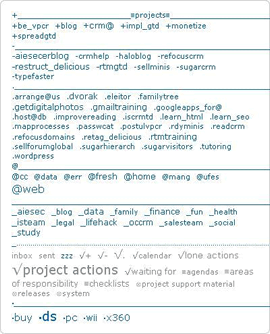
Looks pretty organised, doesn’t it? The forum topic Bern created has a lot of really helpful formatting information in it too, so if you’re interested in getting more from your tagging, it’s a must read.
Do you have a suggestion for our weekly Tips & Tricks post? Got an interesting set-up or idea? Head over to the Tips & Tricks forum, add a new topic, and let us know how you use Remember The Milk. Each week we’ll give away a 1 year Pro account to the user whose idea inspires the Tips & Tricks Tuesday blog post for that week.



