
Tips & Tricks Tuesday: My Tickler Setup

If you’re using Remember The Milk to set up a GTD system, you’ll know that it is important to keep track of upcoming tasks due on a particular date. Traditionally, you would keep these items in a set of folders—a “tickler” file. This week’s tip, shared by tclaiborne, demonstrates a way to keep these organized right in your Remember The Milk tasks.
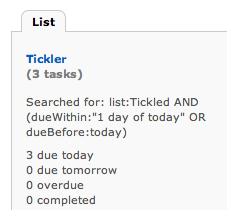
I had been looking for a good solution for Tickler style tasks (a la the 43 folders from GTD), and I’ve finally got one that has stuck in my system.
It involves two lists: a regular list called Tickled, and a Smart List called Tickler.
Tickled is just a regular list. For Tickler, I create a Smart List using the following search:
list:Tickled AND (dueWithin:“1 day of today” OR dueBefore:today)
When I have something that I want to be reminded of on a certain day, I put the task in the Tickled list with a due date of when I want to be reminded.
I can check the Tickler list in the morning each day to see if there’s anything for to check on. The way I prefer to do this though is to use the “A Bit Better RTM” extension for Chrome, which shows the count of tasks next to each list. This way I don’t even need to open the list, I can just glance.
Thanks for sharing this tip, tclaiborne! You’re our Tips & Tricks Tuesday winner this week.
Do you have a suggestion for our weekly Tips & Tricks post? Got an interesting set-up or idea? Head over to the Tips & Tricks forum, add a new topic, and let us know how you use Remember The Milk. Each week we’ll give away a 1 year Pro account to the user whose idea inspires the Tips & Tricks Tuesday blog post for that week.



