
Tips & Tricks Tuesday: Creating tasks quickly with Outlook signatures

If you deal with a lot of email (and a lot of us do!) and would like to turn your messages into tasks, blevinweb’s handy tip will be very welcome:
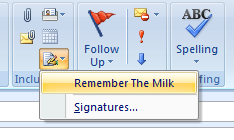
I used to work off my Outlook email inbox AND my RTM list. Then I figured out a very simple yet powerful way to make them play nice.
I created an Outlook Signature like this, called RTM:
Location: Work
List: (w) Daily
Tags: next
—
When someone sends me an email that I would like an RTM task for, I do this:
1. Click Forward.
2. Select (or type) the RTM contact in the To: field.
3. My default signature appears at the top of the forwarded message. I click on the Signature button in the Message window and change it to RTM. The RTM signature appears. By having the 3 dashes at the end of my RTM signature the message body will be inserted as a task note!
4. Click Send.
The task shows up in my (w) Daily list, tagged as “next” for my Smart List with the task name set to the subject of the email (which I sometimes edit if it is too vague before sending), and the body of the email is neatly placed in the Notes tab.
Using this technique allows me to get to a “Zero Inbox” zen-like state and places all my tasks in one central location. Enjoy!
blevinweb also mentions using a separate signature for different lists or high priority items; read more about Remember The Milk for Email to see all the options.
Also check out this previous tip for a similar method in Gmail.
Thanks for sharing this tip, blevinweb! You’re our Tips & Tricks Tuesday winner this week.
Do you have a suggestion for our weekly Tips & Tricks post? Got an interesting set-up or idea? Head over to the Tips & Tricks forum, add a new topic, and let us know how you use Remember The Milk. Each week we’ll give away a 1 year Pro account to the user whose idea inspires the Tips & Tricks Tuesday blog post for that week.



