Tips & Tricks Tuesday: Clean up your credit history with Smart Add

This week, ryanburnett shares a tip about keeping track of your credit score by requesting a report from each credit agency once a year.
Throughout our lives, whether it’s in college or afterwards, we’ve had several opportunities to get free *something* for signing up for a credit card. Unfortunately this directly affects our credit score, which is calculated into much more important transactions such as getting a car loan or mortgage.
The good news is that the three major credit reporting agencies, Equifax, Transunion and Experian, are required to provide a free yearly credit report. To view your report go to http://annualcreditreport.com (please be sure to use this exact URL, as there are several other similar sites that will try to scam you).
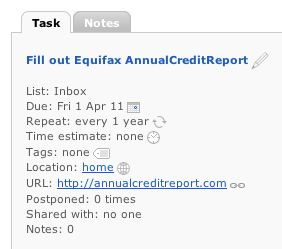
I use Remember The Milk to help manage the process of repairing my credit score from those times in my past when I didn’t know any better. Since all three agencies offer a free annual report, you can get one report every four months. I set up these repeating tasks by typing in the following to the Smart Add bar:
Fill out Equifax AnnualCreditReport http://annualcreditreport.com apr 1 *yearly
Fill out Transunion AnnualCreditReport http://annualcreditreport.com aug 1 *yearly
Fill out Experian AnnualCreditReport http://annualcreditreport.com dec 1 *yearly
Every four months when one of these tasks appears I click the URL, proceed through the corresponding agency’s site and print out my free credit report. I check the report for things like unused credit cards and call the respective company to cancel them. Of course if there are any outstanding balances or other unpleasant surprises make sure to have those taken care of right away. I also add a note of these communications on the next RTM credit report task (because I’ll probably have forgotten about it in four months).
Thanks for sharing this tip, ryanburnett! You’re our Tips & Tricks Tuesday winner this week.
Do you have a suggestion for our weekly Tips & Tricks post? Got an interesting set-up or idea? Head over to the Tips & Tricks forum, add a new topic, and let us know how you use Remember The Milk. Each week we’ll give away a 1 year Pro account to the user whose idea inspires the Tips & Tricks Tuesday blog post for that week.