
New for Pro: Introducing MilkSync for BlackBerry

It’s been a much-requested feature, so we’re very excited today to be launching the second application based on our MilkSync task synchronization platform: MilkSync for BlackBerry!

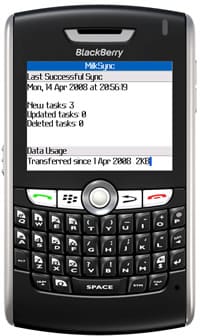
MilkSync for BlackBerry (as demonstrated by Bob T. Monkey in the above photo) is an application that synchronizes Remember The Milk with the built-in Tasks application on your BlackBerry. Features include:
- Two way synchronization (or optionally RTM to BlackBerry, or BlackBerry to RTM)
- Scheduled synchronization (e.g., automatically sync every 15 minutes)
- Include all lists or specific lists from RTM in sync
- Easy access to sync via the menu in the Tasks application
If you’re a Google Calendar fan, MilkSync for BlackBerry makes a great companion to (and was inspired by!) Google Sync, Google’s software for syncing Google Calendar with the built-in calendar on your BlackBerry.
MilkSync for BlackBerry is available with a Pro account, and you can learn more about it on the MilkSync for BlackBerry page.
Thanks, testers!
MilkSync for BlackBerry happened to be the very first feature we released early to members of the RTM Pro Tester Program. We’d like to say a huge thank you to everyone who helped us out by trying pre-release versions of the software, sending us feedback, and reporting the odd bug or two.
(A special note for testers: If you’re still using an earlier version of MilkSync for BlackBerry, we’d recommend updating to the current version to make sure you have the latest bug fixes and added features.)
Ready to start syncing with your BlackBerry?
Head on over to the MilkSync for BlackBerry page to learn how to install MilkSync for BlackBerry on your device.
Download MilkSync for BlackBerry
If you don’t have a Pro account yet, you’ll be able to try the software free for 15 days (just install it and start syncing to begin your trial :)



