
Featured integration: Vimperator Plugin Extension

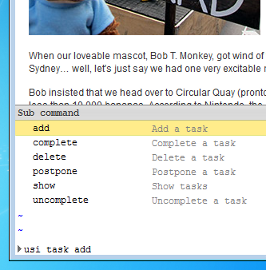
I bet you’re tired of using that clunky old mouse to surf the internet and you wish your browser acted more like a text editor. (Wait, everybody doesn’t think that?) If you’re a big fan of Vim, or if you’re just in the mood to try something a little different, look no further than the Vimperator plugin for Firefox. The plugin transforms your browser into a Vim-like environment where actions are performed by typing commands. And while you’re at it, why not install the Remember The Milk extension script so you can manage your tasks from within the browser? Vimperator is a standard add-on which can be installed from Firefox’s Add-on menu. After installing it, place the extension script file in ~/.vimperator/plugin/ (for Mac and Linux) or in %HOME%\vimperator\plugin (for Windows) and restart Firefox. The command used to manage your tasks is :usi. Once you enter this command, Vimperator will walk you through the available sub-commands with its suggestion menus. From the Vimperator command line, you’re able to add tasks with the :usi task add command, and Smart Add syntax can be used to assign task properties. Tasks can also be completed, uncompleted, postponed and deleted. These commands will display a list of available tasks and assign a unique number to each one. You can reference the task by its assigned number, or cycle through the tasks using Tab. One thing to be aware of is that the extension script caches your task data to allow speedy suggestions as you type. If you find that some of your tasks aren’t being shown by the plugin, it may be necessary to use the :usi cache clear command to force a refresh of your task data. Looking for more ways to interact with your tasks? Head on over to our Apps page and have a look around!



