
Featured integration: SimpleRTM Interactive Emacs Mode

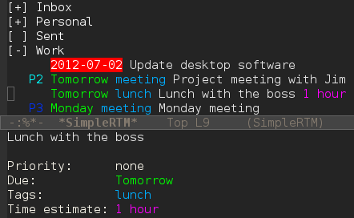
So you’re a card-carrying member of the Church of Emacs and the list of things you do with Emacs seems to grow on a daily basis, right? It’s time to add task management to that list. SimpleRTM is an interactive Emacs mode by Moritz Bunkus which is based on earlier work by Seth Mason and Friedrich Delgado Friedrichs. It allows you to manipulate your tasks from within Emacs using keyboard commands. Many of the commands mirror the keyboard shortcuts used in the Remember The Milk web app, so if you’re familiar with those you’ll be right at home. The SimpleRTM project page gives instructions on how to install the mode. Once it’s installed, switching to simple-rtm-mode will display your task lists from Remember The Milk. Navigate the cursor to a list and use the TAB key to expand or collapse it to view its contents. Tasks are color-coded to indicate various properties including priority, tags, due dates and time estimates. To operate on an existing task, you can either navigate the cursor to the task and use keyboard shortcuts, or you can press ENTER to view the task’s details in the bottom window. This allows you to edit individual properties of the task by placing the cursor on them and pressing ENTER. You can also select multiple tasks and act on all of them at once, similar to the web app. A full listing of the keyboard shortcuts can be found by examining the simple-rtm.el file, but here are a few helpful ones available from the task list view to get you started:
%: Refresh all tasks and lists<SPACE>: Select or de-select the current taska: Select all tasks in the current listc: Complete all selected tasks or (if no tasks are selected) the current taskt: Add a new task using Smart Add syntax
Looking for more ways to integrate Remember The Milk into the apps you use every day? Take a look at our Apps page!



