
Command line task management with rumember and Milkmaid

Are you a command line ninja who’s looking for a way to manage your tasks without leaving the terminal? These two apps may be just what you’re looking for: rumember from Tim Pope and Milkmaid from Marius Grigoriu. Both are open source Ruby apps focused on fast and easy command line task management. Once you’ve installed rumember, adding a task is as simple as:

ru Pick up milk ^tomorrow

It doesn’t get much easier than that! You can specify the task’s properties using Smart Add shortcuts, too. Adding tasks quickly is the sole purpose of rumember, so you won’t be able to display or edit existing tasks. If you want a bit more flexibility to manipulate your tasks, give Milkmaid a try. Once it’s installed, you can list your tasks with the following command:

milkmaid task

Color-coding and special formatting will be applied to tasks which are marked with a priority level, are due today or are overdue. Also, a unique ID number will be assigned to each listed task which allows you to reference them when performing other actions such as complete or postpone.
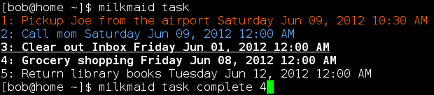
Milkmaid screenshot

One of the great things about command line applications is the way you can often piece them together to customize your workflow. As an example, this article shows how to use rumember with Alfred to quickly add tasks from your Mac desktop with keyboard shortcuts. Good thinking! Interested in making your own application that connects to Remember The Milk? Look over our API and get coding!


Read more

Bob and an elephant sitting side by side.

Tips & Tricks

Tips & Tricks Tuesday: Managing checklists with Evernote

Organizing your lists is an important step to keep your information ready when you want it. This week’s tip comes from gustavo.marins, who shares a simple way to keep a group of checklists within reach for reference. I use Remember The Milk together with Evernote to manage various

2 min read
Bob T. Monkey with 20 chocolate chip cookies.

Behind the Scenes

Birthday #20

This week, we celebrated Remember The Milk’s twentieth birthday! 🎉 Back in 2005, Remember The Milk was just a small idea shared by two humans and one enthusiastic stuffed monkey. It’s hard to believe we’re now celebrating two whole decades of helping people all around the world get

1 min read
Remember The Milk icon and widget on iOS 26.

Updates

iOS update: Now with support for iOS 26 and watchOS 26!

Our latest release updates the app to support iOS 26 and watchOS 26. If you’ve updated to the latest iOS or watchOS, you need to download this update! 😊 Here’s what you’ll find in version 10.0.1: * Improved: We’ve made a whole bunch of fixes to

1 min read
Bob enjoying an espresso and a treat.

Tips & Tricks

Request for your best Tips & Tricks ideas!

Just like a good coffee, we like enjoying our Tips & Tricks posts regularly. To that end, we need your help! We are requesting a fresh batch of your tips, whether you are using Remember The Milk in a unique way, have found something especially helpful, or have a fancy

1 min read

